- Home
- Article
- Installation
Existing database - Integration of an existing local database or an existing data backup
Integration of an existing local database or an existing data backup

Philipp Kaestner
Created: 30.07.2019 1:37 - Updated: 09.02.2021 1:59
If you are currently connected to a database, you must first disconnect. You can find the exact instructions here .
Select the entry "Continue and manage database connection".
To connect to an existing PaperOffice database or to an existing backup, go to your PaperOffice login window and click Continue. This window appears:
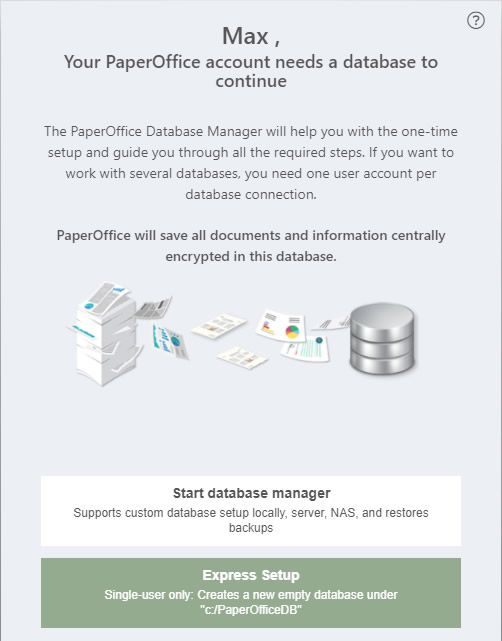
Select "Start database manager".
In the next step, select "Local database" and click on the corresponding icon:

Then select "Use existing database or restore from backup". In the next step in the left section "Default" click in the first field and select the path to the existing database. Confirm your entry by clicking on "Check information, save and continue".

In the next step, select the MasterKeys for the database you just selected and click "Check and continue." The MasterKeys will be validated in the next step and you will be connected to your database.
The connection to your database proves to be successful if the message "Connection successfully established" appears in the upper right window.
This completes the connection to your existing database.
Database recoveryWas this article helpful?
Current Articles
-
DropMail Not Receiving Attachments – Troubleshooting Guide
Problem solution
General07.08.2025 14:13 -
How to Fix Slow Search or Content Loading in PaperOffice by Rebuilding FULLTEXT Indexes
Problem solution
Database15.04.2025 13:55 -
PIA Displays Previous Document Image or Flickers
Problem solution
General10.01.2025 10:05 -
Resolving PaperOffice Database Creation Issues on Synology NAS Devices
Problem solution
General30.08.2024 14:14 -
PaperOffice Only Shows Status - Last Invoice Window on Startup
Problem solution
General02.02.2024 11:09
Categories
-
Automation
API Interface 4 -
Automation
Learn in & storage masks 5 -
Automation
Monitoring 3 -
Automation
PIA storage dialog 2 -
Automation
Register & Login 1 -
Handling
Administrative masks 3 -
Handling
Briefing 1 -
Handling
Calendar 1 -
Handling
Contacts 1 -
Handling
Custom fields 4 -
Handling
Data backup and recovery 5 -
Handling
Database 5 -
Handling
Display types (views) 6 -
Handling
Document properties 1 -
Handling
Documents and document list 16 -
Handling
Document status 4 -
Handling
FolderCrypt and FolderMount 5 -
Handling
Folder and folder list 6 -
Handling
Keyword search and advanced search 5 -
Handling
Login window 2 -
Handling
Mass import 1 -
Handling
Microsoft Office Products (AddIn) 3 -
Handling
Notes and tasks 4 -
Handling
OCR text recognition 5 -
Handling
Password manager 2 -
Handling
Scan (ScanConnect) 7 -
Handling
ShareHub 1 -
Handling
SmartSpell 1 -
Handling
Surface 1 -
Handling
System notifications 3 -
Handling
Updates 1 -
Handling
User 9 -
Handling
Versioning and version management 2 -
Handling
Virtual PDF printer (vPrinter) 1 -
Handling
WebCapture 1 -
Handling
WorkBench Editing tool 1 -
Handling
Workflows and work assignment 1 -
Handling
Working with QR codes 3 -
Installation
Existing database 4 -
Installation
Local database setup 2 -
Installation
Minimum system requirements 1 -
Installation
NAS configuration 9 -
Installation
Own server 3 -
Installation
Program installation 8 -
Installation
Settings 7 -
Installation
Terminal server 2 -
Knowledge
Data security 2 -
Knowledge
GoBD & GDPR 1 -
Knowledge
Legally compliant archiving 1 -
Knowledge
Procedure original documents 2 -
Knowledge
Use of NAS databases 2 -
License model & costs
Costs 6 -
License model & costs
Quantity 1 -
License model & costs
Trial version 1 -
License model & costs
Use with NAS 1 -
License model & costs
Versions 8 -
PaperOffice Online Services
DropMail your custom email address 1 -
PaperOffice Online Services
DropPage your custom website 1 -
PaperOffice Online Services
MailConnect - direct POP3 monitoring of the mail server 1 -
Problem solution
Antivirus software 5 -
Problem solution
Database 3 -
Problem solution
General 14 -
Problem solution
Microsoft Office 3 -
Problem solution
Printer (vPrinter) 2 -
Problem solution
Scanner 3 -
Problem solution
Surface 8 -
Update and Support
General information 8 -
Update and Support
Update history 1 -
Videos and Training
Automated storage 1 -
Videos and Training
Handling 2 -
Videos and Training
Installation and setup 3